INTRODUCTION
I've been looking for a way to convert the color space from RGB (additive) to RYB (subtractive) for a while.
This is because if we want to mix Yellow with Blue, using RGB we get Gray, while, in reality, if we use brushes on a canvas, we get a Green color.
Yellow RGB = (1,1,0) Blue RGB (0,0,1)
Mixed = (0.5, 0.5, 0.5) = Gray.
The internet is full of resources ranging from using equations to trilinear interpolations of the 8 vertices of cubes corresponding to the RGB and RYB color spaces.
However, none of these methods really satisfied me, and the conversions were not one-to-one. That is, converting any RGB color to RYB and then converting it back from RYB to RGB did not yield the original color.
METHOD
One day, as soon as I woke up, this occurred to me:
Looking at the RGB and RYB color spaces from an HSL (Hue, Saturation, Lightness) perspective, you can see that the RGB yellow hue (R+G) corresponds to the RYB yellow hue (Y).
So, primarily, color space conversion must somehow rely on hue conversion, so I thought of using HSL as an intermediate color space.
- The hue is transformed nonlinearly to approximate RYB perception (since pigment mixing behaves differently than light).
- Saturation is preserved and
- Brightness is inverted, as RGB(1,1,1) white will correspond to RYB(0,0,0) white, meaning no pigment on the (white) canvas. And vice versa, RGB(0,0,0) black will correspond to RYB(1,1,1) black, meaning maximum concentration of all pigments. (This isn't entirely true, but it's a simplification.)
In my case, starting with Red on the Hue wheel, I have
Red 0 degrees
Green 120 degrees
Blue 240 degrees
Suppose we want to draw the RYB color space hue wheel.
I notice that the RYB hue from blue to red (counterclockwise) is practically unchanged (equal to RGB), while it's in the slice from red to blue (counterclockwise) that things change significantly compared to RGB.
So I only consider the range from 0 to 240 degrees, or 4/6 of the entire circle.
So I "normalize" the hue angle like this:
| Angle | Circle Slice | Normalized |
| 000 | 0/6 | 0.00 |
| 060 | 1/6 | 0.25 |
| 120 | 2/6 | 0.50 |
| 180 | 3/6 | 0.75 |
| 240 | 4/6 | 1.00 |
Normalized:
When drawing the RYB color space hue wheel, I start with Red and blend the hue until I reach Yellow (which in this case will be at 120 degrees).
I note that this 120-degree endpoint (RYB) corresponds to the RGB Yellow between R and G, or 60 degrees.
That is, the Yellow RGB hue (60 degrees -> 0.25) is translated into the Yellow RYB hue (120 degrees -> 0.5).
Continuing in this way, I now want to draw RYB hues in the range from Yellow to Green (only 60 degrees).
I note that this Green (RYB) 180-degree endpoint corresponds to the RGB Green, or 120 degrees.
That is, the Green RGB hue (120 degrees -> 0.5) corresponds to Green (yellow + blue) in the RYB hue, which is located at (180 degrees -> 0.75).
What I just explained is the crucial aspect of the conversion. It's best to focus and understand this step before reading further.
[CENTER]RGB and RYB wheels
![]()
In any case, at this point I needed a function that would map (transform) the 0-240 degree Hue range normalized to the 0-1 range as follows:
I tried several times to get close, but finally asked some AI, which found (not without initial difficulty) the exact formula.
Also with the help of AI, I found the inverse formula that allows me to transform the inverse hue (for RYB to RGB conversion).
Graph of these transforms HERE
THE MAIN FUNCTIONS:
Another interesting aspect:
RGB to HSL Conversion
My algorithm implements the RGB?HSL conversion using a geometric vector approach rather than the traditional min/max method.
RGB to HSL Conversion
Fundamental concept: We're treating the RGB channels as vectors pointing in the 0°, 120°, and 240° directions in 2D space.
The math:
Create three vectors positioned at 0°, 120°, and 240° around a circle (forming an equilateral triangle).
V1 = (1, 0) represents red at 0°
V2 = (-0.5, 0.866...) represents green at 120°
V3 = (-0.5, -0.866...) represents blue at 240°
What happens:
1. Each RGB component is multiplied by its corresponding vector of length 1.
This results in three vectors pointing in the directions mentioned above (which are fixed) and with lengths equal to the RGB values.
2. The three vectors are added to create a resulting 2D vector.
Saturation is the amplitude of this resulting vector (Euclidean distance).
3. Brightness is simply the average of R, G, and B.
4. Hue is the angle of the resulting vector (using atan2), which is normalized to the range [0, 1].
All in all, this is very simple.
The reverse operation is a little more complicated.
HSL to RGB Conversion
This reverses the process:
1. Convert hue back to an angle. Create a vector with that angle and a magnitude equal to saturation.
(This corresponds to the sum of the three vectors obtained in the previous process.)
2. Depending on the "slice" in which this vector falls, we decompose it into the two directions that form that slice, which can be:
Red (0°) - Green (120°)
Green (120°) - Blue (240°)
Blue (240°) - Red (360°=0°)
This decomposition tells us how long the three vectors placed at 120° along the hue circle should be.
These lengths represent the RGB components.
3. This is not enough.
The current Brightness is calculated, which is given by the current RGB average.
Finally, to all 3 lengths (Current RGB Values) an amount corresponding to the difference between the desired and current Brightness must be added.
You can visualize it here https://htmlpreview.github.io/?https...alization.html
How RGB colors mix using RYB
![]()
Requires RC6.Dll, but not essential, only used to create HSL wheels image. https://www.vbrichclient.com/#/en/About/
Github DOWNLOAD
Other considerations and developments:
This project was completed very quickly, using my less-than-stellar mathematical skills.
Regarding the HSL conversion:
One consideration, for example, could be made regarding the HSL Brightness:
Not all RGB components have the same brightness; for example, Blue is much darker than Green.
In fact, these weights are usually applied to the RGB components to calculate the Brightness:
L = 0.299 * R + 0.587 * G + 0.114 * B.
Well, I tried to take this into account when calculating L, but I couldn't obtain the equivalent HSL2RGB inverse transformation, so the problem is postponed for now.
Regarding the RYB conversion:
One thing I didn't worry about was where the Cyan color ended up
while applying the HUE transformation.
As we said: (ForwardHUEtransform)
Yellow goes from 60 to 120 degrees.
Green goes from 120 to 180 degrees.
And so does Cyan from 180 to 216 degrees. And perhaps it's "squashed" too much.
(I don't know the consequences of this.)
All in all, however, I'm quite satisfied, as the HSL and especially the RYB transformations work both ways; that is, by transforming forward and then backward, I obtain the initial values.
However, I don't rule out further developments/improvements in the future.
2026 - Roberto Mior (miorsoft - reexre)
I've been looking for a way to convert the color space from RGB (additive) to RYB (subtractive) for a while.
This is because if we want to mix Yellow with Blue, using RGB we get Gray, while, in reality, if we use brushes on a canvas, we get a Green color.
Yellow RGB = (1,1,0) Blue RGB (0,0,1)
Mixed = (0.5, 0.5, 0.5) = Gray.
The internet is full of resources ranging from using equations to trilinear interpolations of the 8 vertices of cubes corresponding to the RGB and RYB color spaces.
However, none of these methods really satisfied me, and the conversions were not one-to-one. That is, converting any RGB color to RYB and then converting it back from RYB to RGB did not yield the original color.
METHOD
One day, as soon as I woke up, this occurred to me:
Looking at the RGB and RYB color spaces from an HSL (Hue, Saturation, Lightness) perspective, you can see that the RGB yellow hue (R+G) corresponds to the RYB yellow hue (Y).
So, primarily, color space conversion must somehow rely on hue conversion, so I thought of using HSL as an intermediate color space.
- The hue is transformed nonlinearly to approximate RYB perception (since pigment mixing behaves differently than light).
- Saturation is preserved and
- Brightness is inverted, as RGB(1,1,1) white will correspond to RYB(0,0,0) white, meaning no pigment on the (white) canvas. And vice versa, RGB(0,0,0) black will correspond to RYB(1,1,1) black, meaning maximum concentration of all pigments. (This isn't entirely true, but it's a simplification.)
In my case, starting with Red on the Hue wheel, I have
Red 0 degrees
Green 120 degrees
Blue 240 degrees
Suppose we want to draw the RYB color space hue wheel.
I notice that the RYB hue from blue to red (counterclockwise) is practically unchanged (equal to RGB), while it's in the slice from red to blue (counterclockwise) that things change significantly compared to RGB.
So I only consider the range from 0 to 240 degrees, or 4/6 of the entire circle.
Code:
If H < 0.6666667! Then ' < 4/6| Angle | Circle Slice | Normalized |
| 000 | 0/6 | 0.00 |
| 060 | 1/6 | 0.25 |
| 120 | 2/6 | 0.50 |
| 180 | 3/6 | 0.75 |
| 240 | 4/6 | 1.00 |
Normalized:
Code:
H = H * 1.5! 'H = H / 0.6666667!I note that this 120-degree endpoint (RYB) corresponds to the RGB Yellow between R and G, or 60 degrees.
That is, the Yellow RGB hue (60 degrees -> 0.25) is translated into the Yellow RYB hue (120 degrees -> 0.5).
Continuing in this way, I now want to draw RYB hues in the range from Yellow to Green (only 60 degrees).
I note that this Green (RYB) 180-degree endpoint corresponds to the RGB Green, or 120 degrees.
That is, the Green RGB hue (120 degrees -> 0.5) corresponds to Green (yellow + blue) in the RYB hue, which is located at (180 degrees -> 0.75).
What I just explained is the crucial aspect of the conversion. It's best to focus and understand this step before reading further.
[CENTER]RGB and RYB wheels
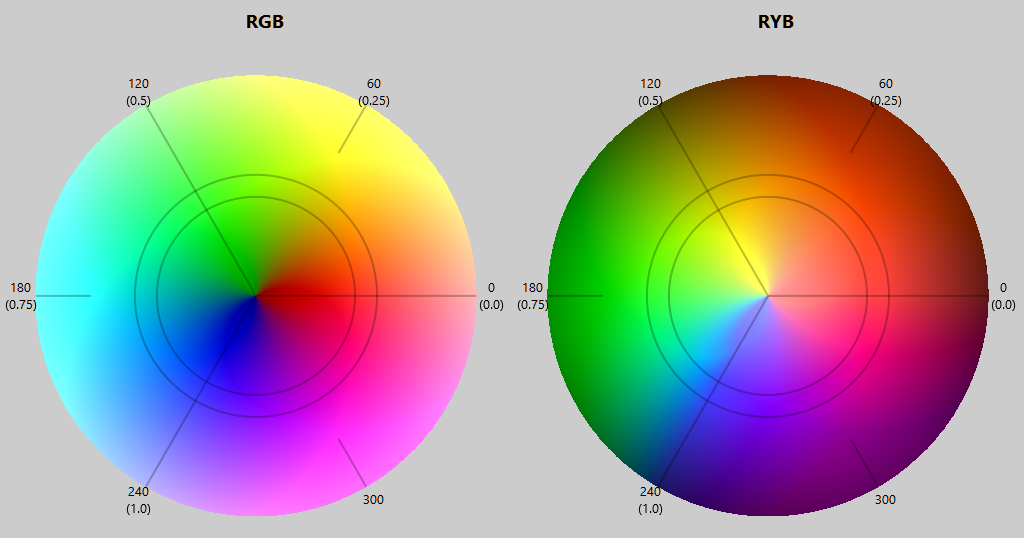
In any case, at this point I needed a function that would map (transform) the 0-240 degree Hue range normalized to the 0-1 range as follows:
Code:
f(0.00) = 0.00                RGB (red)          0  =        RYB (red)      0

f(0.25) = 0.50                RGB (Yellow)  60  = RYB (Yellow) 120

f(0.50) = 0.75                RGB (Green)  120  = RYB (Green)  180

f(1.00) = 1.00 RGB (Blue) 240 = RYB (Blue) 240Also with the help of AI, I found the inverse formula that allows me to transform the inverse hue (for RYB to RGB conversion).
Code:
Private Function ForwardHUEtransform(X!) As Single

    ForwardHUEtransform = 1.206639 * (1 - Exp(-1.764618 * (X ^ 0.860773)))

End Function

Private Function InverseHUEtransform(X!) As Single

    ' InverseHUEtransform = (-Log(1 - (X / 1.206639)) / 1.764618) ^ (1 / 0.860773)

    ' (avoid Division)

    InverseHUEtransform = (-Log(1 - (X * 0.828748)) * 0.566694) ^ (1.161746)

End FunctionTHE MAIN FUNCTIONS:
Code:
Public Sub RGB2ryb(R As Single, G As Single, B As Single)

    '     R--|--G--|--B--|--R

    '     0  1  2  3  4  5  6

    '     0    0.5    1

    Dim H!, s!, L!

    RGB2HSLmy R, G, B, H, s, L

    If H < 0.6666667! Then              '4/6             '< Blue  (Range R=0 Y=.1666 G=0.33333)

        H = H * 1.5!                    '6/4

        H = ForwardHUEtransform(H)

        H = H * 0.6666667!              '4/6

    End If

    L = 1 - L

    HSL2RGBmy H, s, L, R, G, B

End Sub


Public Sub ryb2RGB(R As Single, y As Single, B As Single)

    '     R--|--G--|--B--|--R

    '     0  1  2  3  4  5  6

    '     0    0.5    1

    Dim H!, s!, L!

    RGB2HSLmy R, y, B, H, s, L

    If H < 0.6666667! Then              '4/6

        H = H * 1.5!                    '6/4              ' / 0.6666667

        H = InverseHUEtransform(H)

        H = H * 0.6666667!              '4/6

    End If

    L = 1 - L

    HSL2RGBmy H, s, L, R, y, B

End Sub
Another interesting aspect:
RGB to HSL Conversion
My algorithm implements the RGB?HSL conversion using a geometric vector approach rather than the traditional min/max method.
RGB to HSL Conversion
Fundamental concept: We're treating the RGB channels as vectors pointing in the 0°, 120°, and 240° directions in 2D space.
The math:
Create three vectors positioned at 0°, 120°, and 240° around a circle (forming an equilateral triangle).
V1 = (1, 0) represents red at 0°
V2 = (-0.5, 0.866...) represents green at 120°
V3 = (-0.5, -0.866...) represents blue at 240°
What happens:
1. Each RGB component is multiplied by its corresponding vector of length 1.
This results in three vectors pointing in the directions mentioned above (which are fixed) and with lengths equal to the RGB values.
2. The three vectors are added to create a resulting 2D vector.
Saturation is the amplitude of this resulting vector (Euclidean distance).
3. Brightness is simply the average of R, G, and B.
4. Hue is the angle of the resulting vector (using atan2), which is normalized to the range [0, 1].
All in all, this is very simple.
The reverse operation is a little more complicated.
HSL to RGB Conversion
This reverses the process:
1. Convert hue back to an angle. Create a vector with that angle and a magnitude equal to saturation.
(This corresponds to the sum of the three vectors obtained in the previous process.)
2. Depending on the "slice" in which this vector falls, we decompose it into the two directions that form that slice, which can be:
Red (0°) - Green (120°)
Green (120°) - Blue (240°)
Blue (240°) - Red (360°=0°)
This decomposition tells us how long the three vectors placed at 120° along the hue circle should be.
These lengths represent the RGB components.
3. This is not enough.
The current Brightness is calculated, which is given by the current RGB average.
Finally, to all 3 lengths (Current RGB Values) an amount corresponding to the difference between the desired and current Brightness must be added.
You can visualize it here https://htmlpreview.github.io/?https...alization.html
How RGB colors mix using RYB
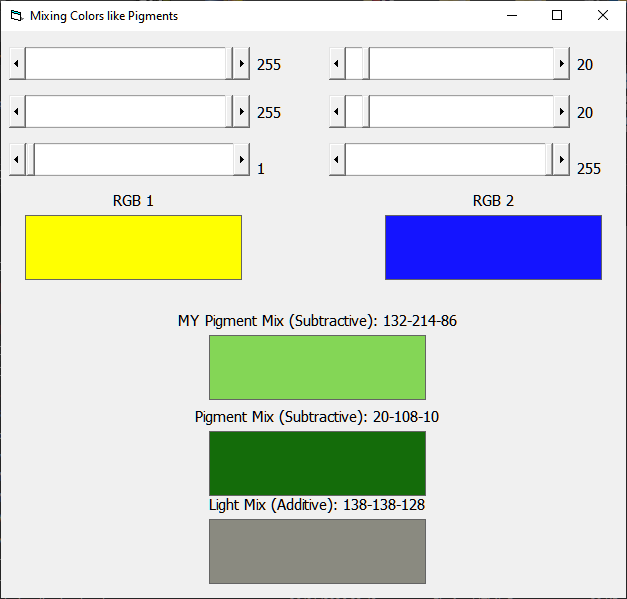
Requires RC6.Dll, but not essential, only used to create HSL wheels image. https://www.vbrichclient.com/#/en/About/
Github DOWNLOAD
Other considerations and developments:
This project was completed very quickly, using my less-than-stellar mathematical skills.
Regarding the HSL conversion:
One consideration, for example, could be made regarding the HSL Brightness:
Not all RGB components have the same brightness; for example, Blue is much darker than Green.
In fact, these weights are usually applied to the RGB components to calculate the Brightness:
L = 0.299 * R + 0.587 * G + 0.114 * B.
Well, I tried to take this into account when calculating L, but I couldn't obtain the equivalent HSL2RGB inverse transformation, so the problem is postponed for now.
Regarding the RYB conversion:
One thing I didn't worry about was where the Cyan color ended up
while applying the HUE transformation.
As we said: (ForwardHUEtransform)
Yellow goes from 60 to 120 degrees.
Green goes from 120 to 180 degrees.
And so does Cyan from 180 to 216 degrees. And perhaps it's "squashed" too much.
(I don't know the consequences of this.)
All in all, however, I'm quite satisfied, as the HSL and especially the RYB transformations work both ways; that is, by transforming forward and then backward, I obtain the initial values.
However, I don't rule out further developments/improvements in the future.
2026 - Roberto Mior (miorsoft - reexre)